How I used a kanban board to shortlist and choose a home
- I built this for my second house using my knowledge of kanban and scrum.
- Four columns: Researching → Viewing → Shortlisted → Offer Made.
- One listing = one card. It only moves forward if it survives a specific objection.
- Forces a decision instead of an open-ended, anxious search.
- Works in Trello, Notion, a whiteboard, or index cards on a fridge.
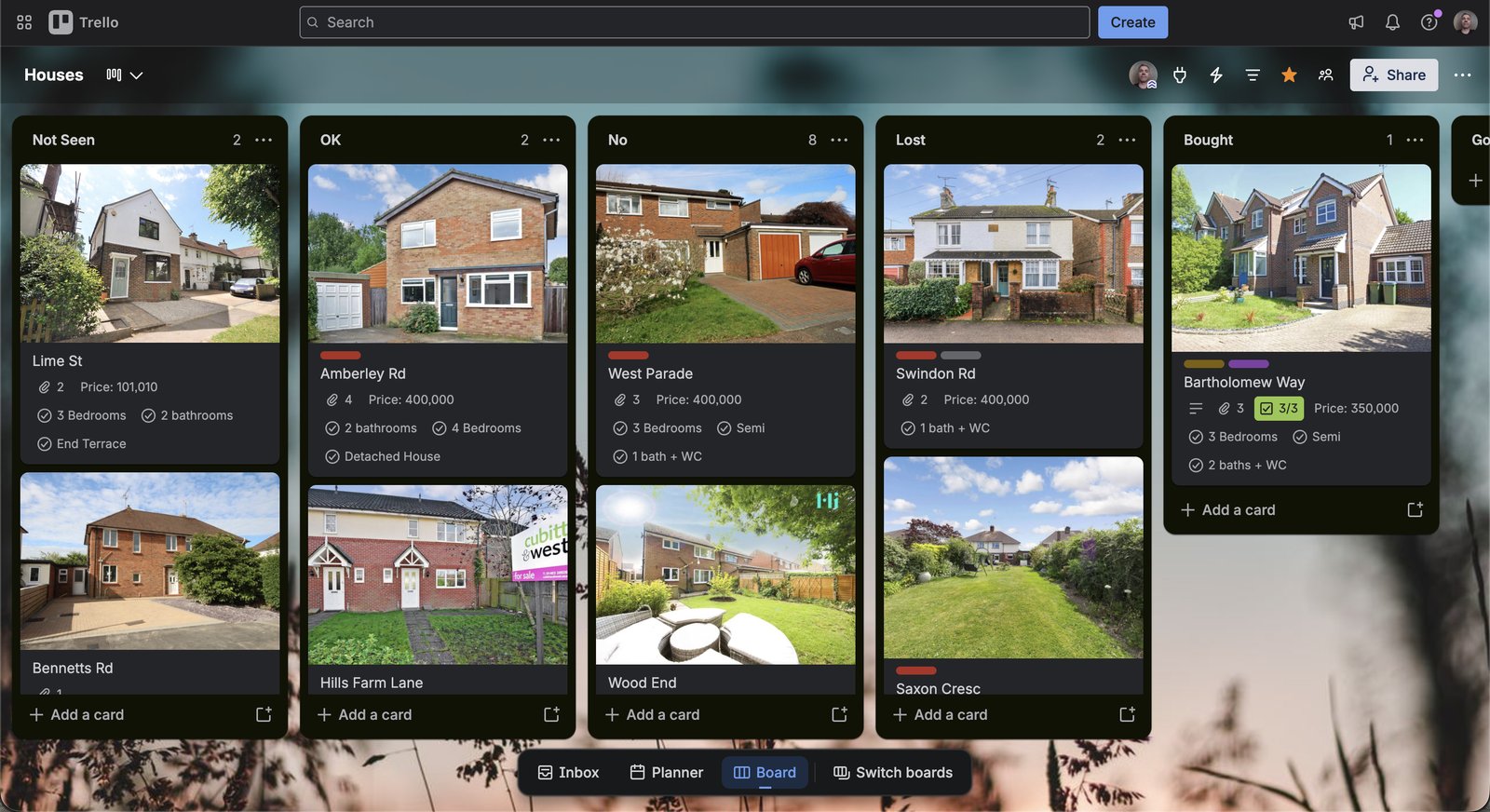
The real board: photo cards with custom fields (bedrooms, bathrooms, price, property type), each linked to its listing.
I looked at dozens of listings before I made an offer on a place. Somewhere around listing 20, they all started to blur together: which one had the noisy road, which one had the weird kitchen, which one I’d actually walked through. I was also making an offer each week — the market was crazy in the UK at that time. Most weeks, we were beaten on our offer. It became a process.
A spreadsheet row per property didn’t help, because a spreadsheet doesn’t show you where a property is stuck. So I used my agile skills and passion for kanban to build a board. It also helped with reviewing properties each week.
The board
Four columns, one card per listing, and a rule: a card only moves right if it survives a specific objection. Vague enthusiasm doesn’t move a card. A crossed-off objection does.
Each card carried a handful of custom fields — price, bedrooms, bathrooms, property type — so I could scan and filter a column without opening a single card. And every card was linked straight back to the real estate listing, so “shortlisted” was always one click from the source photos and price history, not a screenshot I’d have to go hunting for later.
The rule that made it work
Every card carried one line: the specific objection it needed to answer before moving right. “Researching → Viewing” meant the floor plan and price passed a first look. “Viewing → Shortlisted” meant a real walk-through resolved the thing photos couldn’t show, like street noise or whether the rooms were actually big enough. “Shortlisted → Offer” meant the numbers worked at a price I was actually willing to pay, not just the asking price.
Where it almost broke
Cards stayed in Shortlisted for too long — there were too many properties and the board was no longer working. Waiting on feedback from estate agents that never came didn’t help either.
That’s when it was time to start another board: moving cards that were shortlisted into Offer Made.
FAQs
What’s the fastest way to shortlist houses when buying a home?
Use a four-column kanban board (Researching, Viewing, Shortlisted, Offer Made) and move a listing forward only when it survives a specific objection. This forces a decision instead of an endless open-ended search.
How many properties should you view before making an offer on a home?
Most buyers view 8 to 15 properties before finding one worth an offer. A kanban board makes that count visible instead of a blur, and shows which listings you’ve genuinely compared rather than just seen.